

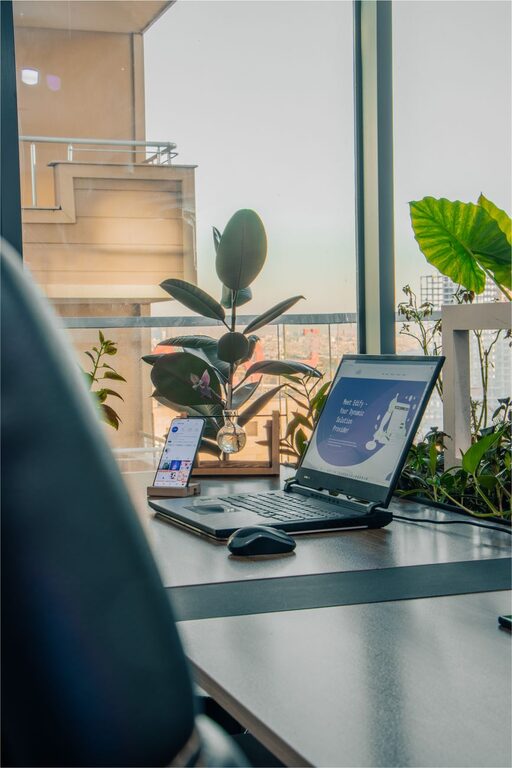
Creating a comfortable and efficient home workspace is essential for anyone working remotely. A well-designed home office helps improve focus, enhances productivity, and supports good posture and overall well-being. Whether you’re new to remote work or looking to optimize your current setup, these tips will guide you in creating a space that promotes your best work.
Choose the Right Location
Selecting the right spot in your home is the first step to an effective workspace.
– Quiet and Private: Pick a location away from high-traffic or noisy areas. This minimizes distractions and helps you concentrate.
– Natural Light: If possible, position your desk near a window. Natural light boosts mood and reduces eye strain.
– Space to Move: Consider a space with enough room for your desk, chair, and some movement. Avoid cramped corners that might feel restrictive.
Invest in Comfortable and Supportive Furniture
Since you’ll be spending long hours at your desk, comfort is key.
– Ergonomic Chair: Choose a chair that supports your lower back and encourages good posture. Adjustable height and armrests can make a big difference.
– Desk at Proper Height: Your desk should allow your elbows to rest at about a 90-degree angle when typing.
– Consider a Standing Desk: If possible, a sit-stand desk lets you alternate between sitting and standing, which can improve comfort and reduce fatigue.
Organize Your Workspace for Efficiency
An organized desk helps keep your mind clear and your workflow smooth.
– Declutter: Keep only essential items on your desk. Store other materials in drawers or shelves.
– Use Organizational Tools: Trays, file holders, and cable organizers reduce mess and save time searching for items.
– Keep Supplies Close: Place frequently used tools like pens, notebooks, and chargers within arm’s reach.
Optimize Lighting
Proper lighting reduces eye strain and helps maintain energy throughout the day.
– Balance Natural and Artificial Light: Use window light during the day, and add desk lamps with adjustable brightness for cloudy days or evenings.
– Avoid Glare: Position your monitor to minimize reflections or glare from windows or overhead lights.
– Use Warm or Neutral Light: Cool white lighting can be harsh; warm or neutral tones tend to be easier on the eyes.
Set Up Your Technology Thoughtfully
A reliable and efficient setup supports a smooth remote work experience.
– High-Speed Internet: Ensure your connection is fast and stable to avoid interruptions during meetings or downloads.
– Ergonomic Keyboard and Mouse: Tools that fit well in your hands reduce strain during long typing sessions.
– Monitor Placement: Your screen should be at eye level, about an arm’s length away, to prevent neck and eye discomfort.
– Headset or Speakers: For clear communication during video calls, invest in a quality headset or speakers.
Personalize Your Space
A workspace that feels inviting can boost motivation and reduce stress.
– Add Plants: Indoor plants improve air quality and add a calming touch.
– Include Personal Touches: Photos, art, or inspirational quotes can make your area more enjoyable.
– Use Color Wisely: Soft, neutral tones create a calm environment, while pops of color can inspire creativity.
Establish Boundaries and Routine
Your workspace should support a healthy work-life balance.
– Separate Work and Rest Areas: Try to limit work activities to your workspace to mentally separate work time from relaxation.
– Set Daily Hours: Having a consistent schedule helps maintain productivity and signals when it’s time to stop working.
– Take Regular Breaks: Use breaks to stretch, walk, or rest your eyes, which benefits both physical and mental health.
Manage Noise and Distractions
Even the best workspace can be disrupted by noise.
– Use Noise-Canceling Headphones: They help you concentrate in louder environments.
– White Noise Machines or Apps: These can mask distracting sounds.
– Communicate Boundaries: If you share space with family or roommates, set clear expectations about quiet time.
Keep Indoor Air Quality in Mind
Air quality affects focus and comfort during the workday.
– Ventilation: Open windows when possible to circulate fresh air.
– Air Purifiers: Consider a small air purifier if ventilation is limited.
– Humidity Levels: A humidifier or dehumidifier can help maintain comfortable air moisture, especially in extreme climates.
Conclusion
Creating an effective home workspace takes some planning, but the benefits to your productivity and well-being are worth the effort. By carefully selecting your location, investing in the right furniture and technology, organizing efficiently, and personalizing your space, you can build an environment that supports your best remote work. Remember to set boundaries and maintain a routine to balance your professional and personal life effectively. With these tips in mind, your home workspace can become a place where you thrive.