

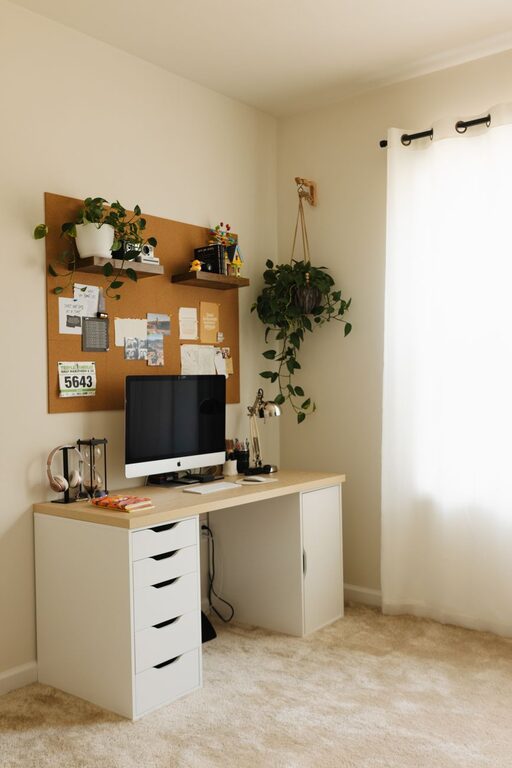
Creating a home workspace that balances comfort and functionality can make a big difference in your daily productivity and overall well-being. Whether you work from home full-time or need a dedicated spot for occasional tasks, a thoughtfully designed workspace boosts focus and reduces stress. In this post, we’ll share practical tips to help you create a cozy and efficient home office you’ll enjoy spending time in.
Why a Cozy and Functional Workspace Matters
A workspace that feels welcoming encourages you to settle in and focus without distractions. Comfort reduces physical strain and mental fatigue, while thoughtful organization keeps tools and supplies at your fingertips. This balance makes work feel less like a chore and more like a natural part of your day.
Step 1: Choose the Right Spot
Start by picking a location that suits your needs.
– Natural Light: Ideally, select a space near a window to benefit from natural light, which helps reduce eye strain and improve mood.
– Quiet Zone: Choose a quieter part of your home, away from high-traffic areas, to minimize interruptions.
– Space Availability: Make sure the spot has enough room for your desk, chair, and other essentials without feeling cramped.
If space is limited, consider transforming a corner of a living room, bedroom, or even a hallway nook into a dedicated work area.
Step 2: Invest in a Comfortable Chair and Desk
Ergonomics are key to comfort and productivity.
– Chair: Select an adjustable chair that supports your lower back and encourages good posture to avoid discomfort during long hours.
– Desk: Choose a desk that fits your space and offers enough surface area for your computer, notebook, and other tools.
– Adjustable Options: If possible, consider a standing desk or a desk converter to alternate between sitting and standing.
Step 3: Optimize Lighting
Good lighting reduces eye strain and sets a cozy mood.
– Ambient Light: Position your desk to maximize natural daylight but avoid glare on your screen.
– Task Lighting: Use a desk lamp with adjustable brightness for focused lighting when needed, especially in the evening.
– Warm Bulbs: Opt for warm-toned bulbs to create a relaxing atmosphere, balancing function with coziness.
Step 4: Organize with Purpose
A clutter-free space helps keep your mind clear.
– Storage Solutions: Use shelves, drawers, or boxes to keep papers, cables, and supplies organized.
– Desk Accessories: Invest in desk organizers or trays to keep essential items within reach and tidy.
– Cable Management: Use clips, sleeves, or cable boxes to prevent cords from tangling or cluttering your desk.
Regularly declutter to maintain an efficient workspace.
Step 5: Personalize Your Space
Incorporate elements that make your workspace pleasant and inspiring.
– Plants: Adding greenery boosts mood and air quality. Small potted plants or succulents work well even in limited light.
– Artwork: Hang pictures or motivational quotes that brighten the space and make it feel like your own.
– Textiles: Soft cushions, rugs, or throws can add warmth and comfort without taking up space.
Just be careful not to overcrowd your workspace, as too much decoration may become distracting.
Step 6: Set Up Technology Thoughtfully
Make sure your tech setup supports your work efficiently.
– Hardware Placement: Position your monitor at eye level and about an arm’s length away to reduce neck and eye strain.
– Peripherals: Use ergonomic keyboards and mice to minimize hand and wrist fatigue.
– Connectivity: Ensure reliable internet access and organize cords neatly to avoid distractions.
Step 7: Create a Routine and Boundary
Your workspace is part of a productive mindset.
– Work Hours: Establish regular working hours to separate work time from personal time.
– Breaks: Incorporate short breaks to stretch, hydrate, and reset your focus.
– Workspace Rules: If sharing your home, communicate your workspace needs to family or roommates.
Summary Checklist for a Cozy and Functional Workspace
– Choose a quiet, well-lit spot with natural light
– Invest in ergonomic chair and desk
– Use warm and adjustable lighting
– Organize with shelves, drawers, and cable management
– Personalize tastefully with plants and artwork
– Set up technology ergonomically
– Create boundaries and routine for work-life balance
Designing your home workspace with these tips will not only boost your productivity but also make working from home more enjoyable. A cozy, functional environment sets the stage for success and well-being, allowing you to focus and thrive every day.